


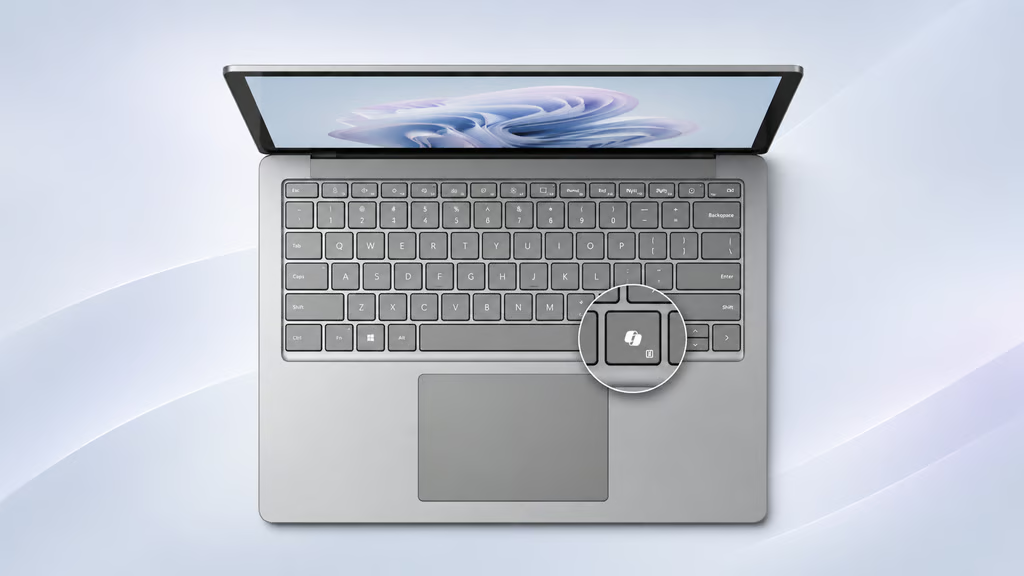
Microsoft is giving Windows 11 users a way to reclaim a keyboard function displaced by Copilot. The dedicated AI key can now serve as Right Ctrl or the Context Menu key on supported PCs.
The change, documented in Microsoft’s September and October 2026 updates, restores familiar keyboard functions without requiring third-party remapping software. Availability remains gradual, however, and not every keyboard with a Copilot key supports the new options.
The feature addresses a problem dating to 2024, when some manufacturers replaced Right Ctrl or Context Menu with the Copilot key. Microsoft acknowledged the disruption to keyboard shortcuts and assistive technologies, including screen readers.
The setting first appeared in Windows Insider builds on September 10. Microsoft’s September 22 update, KB5124010 documented the feature for Windows 11 versions 24H2, 25H2 and 26H2. The October 28 update, KB5127653 also included it for version 26H1.
Turn the Copilot key into Right Ctrl or Context Menu
The setting offers two traditional keyboard functions:
- Right Ctrl: Restores a Control key used for shortcuts and keyboard navigation.
- Context Menu: Opens available actions for a selected item, similar to right-clicking with a mouse.
Remapping does not remove Copilot, which remains accessible through other supported methods. Microsoft is also retiring eight OneDrive Copilot commands from File Explorer beginning in November, while retaining other ways to access the assistant.
To check for the new setting, open Settings > Bluetooth & devices > Keyboard and locate the Copilot key customization option. Select Right Ctrl or Context Menu if available.
The feature is rolling out gradually, and compatibility depends on the manufacturer’s keyboard design, firmware and configuration. Microsoft recommends using either Windows’ built-in customization setting or the manufacturer’s keyboard utility, not both.
One limitation remains. Shortcuts combining the remapped Right Ctrl key with Windows or Shift may not work normally. Microsoft recommends using Left Ctrl for those combinations.
Keyboard compatibility varies across Windows PCs
Organizations managing different laptop models should verify which devices expose the setting before recommending it across their fleets. Even PCs running the same Windows version may behave differently because of manufacturer-specific keyboard implementations.
Testing should cover frequently used shortcuts and accessibility workflows, especially where employees rely on screen readers or keyboard-only navigation. Beyond keyboard compatibility, administrators maintaining Windows configurations can use the TechRepublic Windows 11 Security Cheat Sheet to review encryption, authentication and other built-in protections.
IT teams can document remapping results by device model, Windows build and keyboard configuration. These checks can be included in broader Windows maintenance procedures alongside update and hotpatching assessments.
Users encountering problems can open Feedback Hub with Windows + F or contact Microsoft’s Disability Answer Desk. The setting gives users a way to recover familiar keyboard controls, provided their PCs support it. For managed devices, confirming shortcut compatibility remains the last step before recommending the change.
Read more: Windows 11 is also gaining new right-click menu customization controls, allowing users to reorganize File Explorer commands and reduce menu clutter.