


Project management information systems extend far beyond the tools for managing tasks and schedules. A PMIS provides the foundation for governance and performance oversight by linking project records, reporting practices, and delivery processes. This article explains how PMIS functions across the project lifecycle, how modern platforms integrate into this process, along with examples of how different industries apply it.
- What is a project management information system (PMIS)?
- Project management systems vs. PMIS: What’s the difference?
- Why PMIS matters across the project life cycle
- How to set up a PMIS: A step-by-step implementation checklist
- How project management platforms support a PMIS
- Key components of an effective PMIS
- Real-world use cases of using PMIS
- Best practices for implementing a PMIS successfully
- FAQs
What is a project management information system (PMIS)?
A project management information system, often called a PMIS, is a centralized framework that defines how project data is collected, stored, and used across the project lifecycle. It acts as a central environment where schedules, budgets, performance data, and files are managed across roles.
Rather than acting as a single application, a PMIS shows how information moves across the organization. This helps project teams rely on consistent data when tracking performance, addressing issues, and reporting outcomes to stakeholders.
Project management systems vs. PMIS: What’s the difference?
A project management system usually refers to a software tool used for organizing tasks and managing schedules. A project management information system takes a broader approach by managing the data that supports those activities, such as reports, cost records, and progress documentation.
While a project management system can exist on its own, a PMIS is the broader environment that connects tools, data, and processes into a single source of project intelligence.
| Primary role | Manages tasks, schedules, and project execution | Manages project data, records, and documentation |
| Main function | Coordinates daily activities and resources | Collects and organizes information used across the project life cycle |
| Focus area | Operational control of projects | Information control and analysis |
| Typical users | Project managers, team members | Project managers, analysts, and stakeholders |
| Outcome | Efficient task and schedule management | Reliable data for monitoring, reporting, and decision making |
Why PMIS matters across the project life cycle
A project management information system supports each stage of a project by managing how information is captured, organized, and interpreted as work progresses. Its value grows once teams move from planning into execution and closeout because decisions rely on accurate data rather than isolated updates. A PMIS also allows for automation key workflows and updates information across connected platforms, reducing manual effort and ensuring teams work from a consistent, up-to-date source of truth.
- Improves planning and estimation
A PMIS gathers cost data, schedules, and resource details from past projects, helping managers develop realistic baselines. These references make initial planning more precise and reduce the likelihood of overcommitment.
- Enhances team coordination
The system provides a single platform where teams track progress and share updates in real-time. It ensures that tasks, milestones, and dependencies synchronize with project goals.
- Strengthens monitoring and control
PMIS tools collect progress data and present it through reports or dashboards. Managers can identify budget deviations or missed milestones ahead of time and adjust the schedule or resources before performance declines.
- Supports risk management
Project data stored in a PMIS helps identify recurring issues that could affect timelines or budgets. By analyzing historical patterns, managers can anticipate potential problems and plan mitigation strategies with greater confidence.
- Improves evaluation and knowledge retention
A PMIS stores all documentation, reports, and post-project assessments for later use. These records create a knowledge base that strengthens planning and execution in future projects.
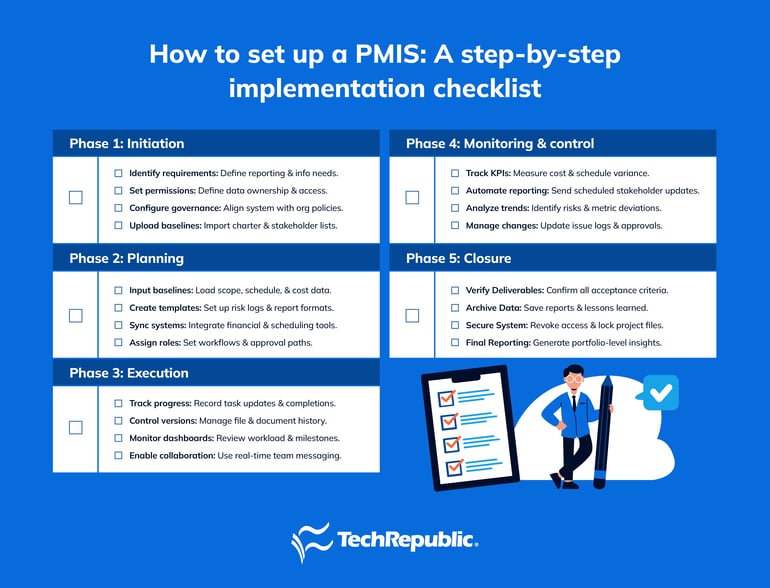
How to set up a PMIS: A step-by-step implementation checklist
To understand how a PMIS operates within project management, the checklist below outlines the implementation steps for each phase of the project lifecycle.
How project management platforms support a PMIS
The following platforms show how PMIS tools work and how their features support information management across various project needs.
Smartsheet: Best for portfolio management
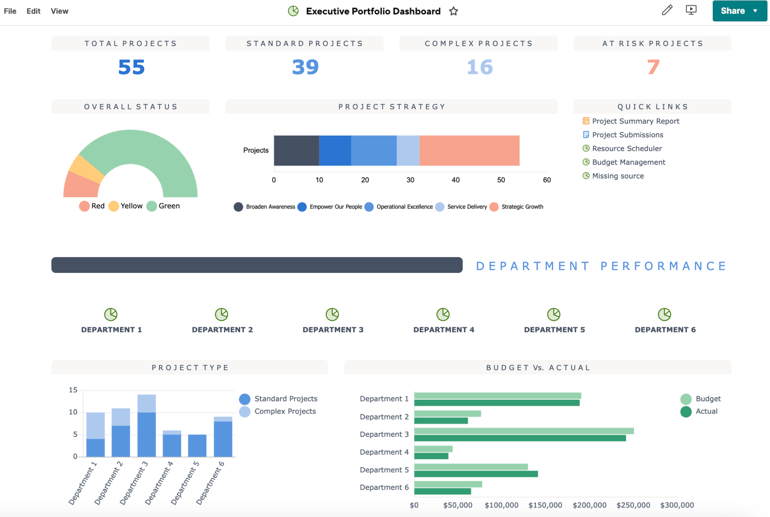
Smartsheet operates as a portfolio management tool designed to organize large volumes of project data. It combines spreadsheet-style sheets with automation and reporting to help managers make data-based adjustments throughout the project lifecycle.
Users can consolidate information from multiple project sheets into aggregated dashboards and roll-up reports. Collect key metrics, such as phase status, spending totals, and forecast completion dates in one place, so you can review outcomes and trends across several initiatives.
ClickUp: Best for team communication
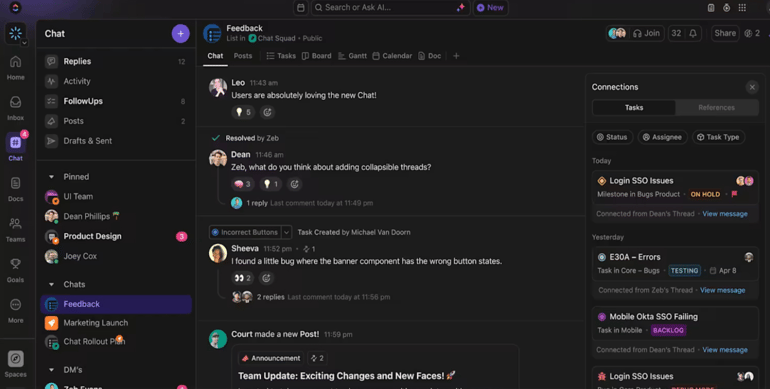
ClickUp focuses on collaboration by giving teams a unified workspace for task management. It supports a PMIS by connecting task updates and feedback to work items through comments, chat channels, and meeting notes. Project managers and stakeholders can review not only what changed within a project, but also the reasoning and discussions that influenced those outcomes when assessing performance or making follow-up decisions.
monday work management: Best for data visualization
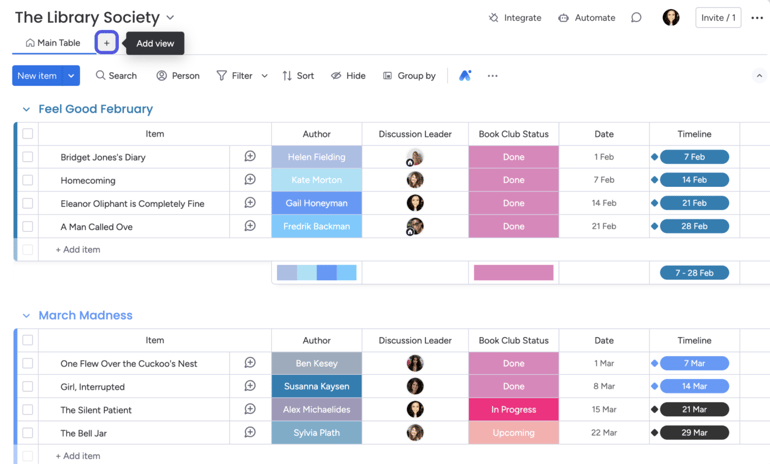
monday work management specializes in data visualization, presenting project information through customizable charts and dashboards. The grid-style interface organizes project records into rows and columns that represent work items and timelines, while color-coded blocks signal task status or priority based on predefined rules. These visual cues allow managers to scan large volumes of project information and identify patterns or exceptions without reviewing individual task records.
Best Project Management Software
- Best Free Project Management Software
- Best Project Management Software for Small Businesses
- Best Project Management Software for Mac Users
- Best Marketing Project Management Software
- Best Project Management Software for Startups
- Best Project Management Software for Engineers
Key components of an effective PMIS
Workflow automation, document management, and data storage are components that make an effective project management information system. These elements work together to manage project data and create a structure for tracking progress.
Data collection & storage
A PMIS captures information from project activities such as schedules, budgets, and progress updates, then stores it in a central repository. This allows teams to access consistent data for planning and reporting throughout the project lifecycle.
Document management
The system organizes project documents, including contracts and design files, in an accessible format. It helps teams maintain version control and ensures every participant references the most recent material.
Reporting & analytics
A PMIS generates reports that summarize performance against baselines, such as cost and time. These reports enable project managers to identify issues and adjust plans based on verified information.
Workflow automation
Automated workflows minimize delays caused by repetitive tasks. Tasks such as approvals or data submissions move through the system according to predefined rules, improving accountability and efficiency.
Cost & budget tracking capabilities
A PMIS includes mechanisms to record estimations, approved budgets, and ongoing expenditures. This information supports forecasting and identifies financial risks before they escalate.
Communication and collaboration tools
Teams exchange updates through messaging, comment threads, or shared dashboards. This reduces data siloes across departments and keeps stakeholders informed throughout each phase.
Access control and security
Permission settings determine who can access project data. Controlled access protects sensitive information and supports compliance with organizational policies.
Integration with other systems
An effective PMIS connects with accounting, resource planning, or scheduling platforms. This link prevents data duplication and provides a unified view of project performance.
Real-world use cases of using PMIS
Project management information systems are applied differently depending on industry demands, regulations, and project scale, but their role remains centered on managing information that supports delivery decisions. The following examples show how organizations in construction and healthcare apply PMIS principles:
- Construction project management
Construction companies rely on PMIS platforms to coordinate contractors, suppliers, and design teams across multiple job sites. The system tracks cost estimates and material deliveries in one database, so managers can monitor progress against contractual milestones.
When issues such as weather delays or change orders occur, the PMIS records every change with timestamps and supporting documentation. This audit trail enhances claims management and enables leaders to evaluate contractor performance on future projects.
- Healthcare program implementation
In healthcare environments, PMIS tools manage initiatives such as facility upgrades, equipment installations, and patient care improvement programs. Hospitals utilize the system to track procurement schedules and comply with regulatory requirements.
Each update, including equipment delivery or staff training completion, is recorded in the system to give administrators an accurate view of readiness before implementation. By connecting clinical teams and procurement officers through a shared information platform, the PMIS reduces communication gaps and strengthens decision-making.
Best practices for implementing a PMIS successfully
Implementing a PMIS requires more than selecting tools and rolling them out to teams. Long-term success depends on how well the system supports decision-making and consistent use across projects, both within the PMO and across the broader organization.
- Set clear objectives and success criteria
Begin by identifying the exact outcomes expected from the PMIS, such as improved data consistency or faster reporting. Establishing these goals guides tool configuration and provides a basis for measuring performance after rollout. - Engage stakeholders from the start
Involve project managers and team members in prior discussions about data needs and workflows. Their input ensures the system supports actual project activities rather than assumptions about how work is managed. - Develop a phased implementation plan
Introduce the PMIS gradually through pilot teams or limited modules. A staged rollout allows for adjustments in process design, data fields, and access settings before the system expands across all projects. - Provide continuous training and support
Training should extend beyond initial onboarding. Ongoing sessions help users adapt to new features, improve data accuracy, and understand how PMIS reports affect project evaluation and resource allocation. - Monitor data quality and system performance
Regular audits confirm that project information remains complete, accurate, and timely. Reviewing these results helps administrators identify gaps in user behavior or process design that require corrective action.
FAQs
What is the role of the PMO in a PMIS?
The PMO defines how a PMIS is used across projects by setting standards for data, reporting, and governance. It also oversees system adoption to ensure project information supports portfolio oversight and executive decision-making.
Is Microsoft Project a PMIS?
Microsoft Project is not a PMIS on its own because it functions as a scheduling and planning tool. It can operate as one component within a broader PMIS that includes reporting and document management.
Does every organization need a PMIS?
Not every organization needs a formal PMIS, but most benefit from some form of project information management as project volume grows. The complexity of projects and reporting requirements usually determines how extensive the PMIS needs to be.